One list, on both your phones
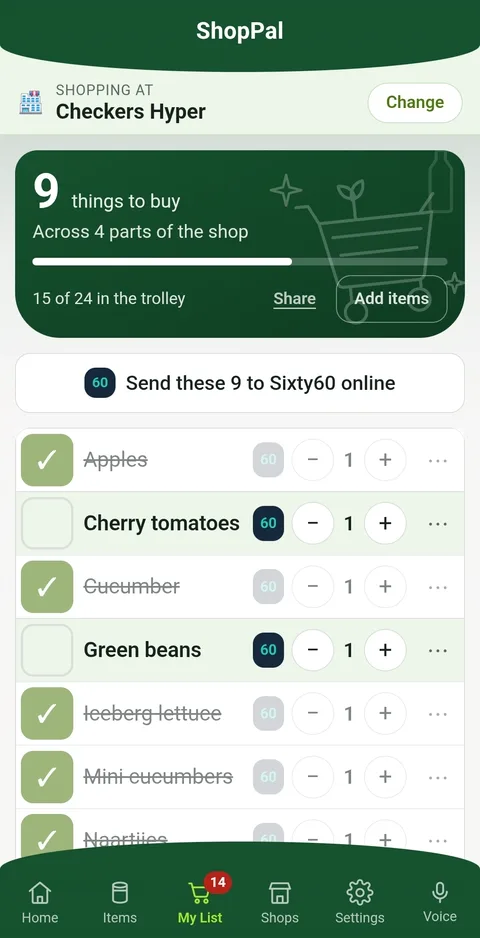
Put the list on two phones at once and either of you can add to it during the week — the thing you noticed at breakfast is there when the other one is standing in the shop. Ticking something off in the aisle takes it off the other phone too, so the answer to "did you get bread?" is on the screen rather than in a message.
Open the app and it tells you what arrived while you were not looking. If you want, it can buzz you instead — "Please stop at Checkers — 3 things to pick up", or that somebody has finished at a shop. It names the shop and counts the things, never what they are, and the message is sealed with a key only your own phones hold — so what passes through Google or Apple is something neither of them can read. The app fills in the rest the moment you open it.
Setting it up is reading a code off one phone into the other. There is nothing to sign up for and nothing to pay, and either of you can stop it from your own phone without disturbing the other's list.
It learns each shop's aisle layout by itself
No aisle numbers to type in, no store layouts to pick from. Adding a shop is typing its name — Checkers, Pick n Pay, Woolworths, Spar, Shoprite, Dis-Chem, Makro and a hundred more supermarkets are recognised as you type. It works the rest out on its own, as a by-product of shopping you were doing anyway.
Hundreds of products built in, already sorted
A new list arrives with several hundred everyday groceries already in their aisles — bread and milk through to biltong, rooibos and braai wood. Type something new and it guesses the aisle, and shows you the guess before you commit.
Your usuals, one tap each
The things you actually buy sit on a Usuals screen, so the weekly shop is a few taps rather than typing the same twenty things again. Nothing to set up.
Several shops, one shopping list
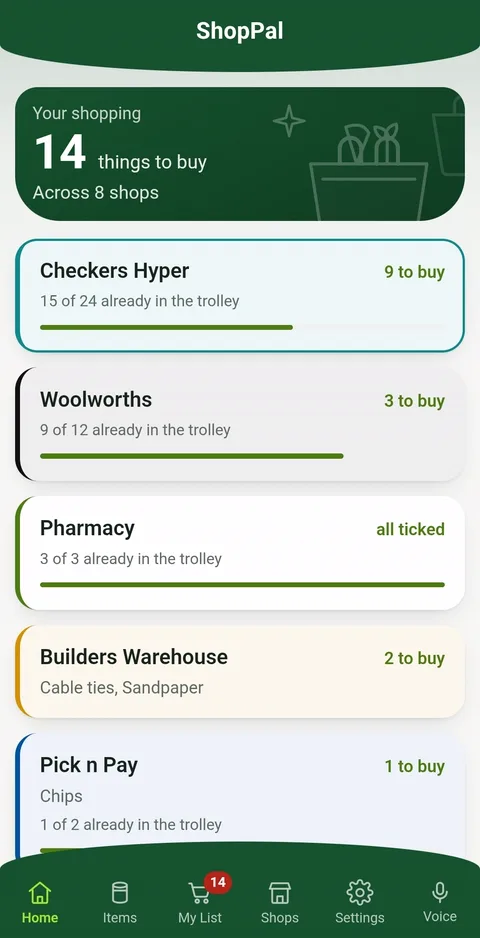
Each shop keeps its own list and its own layout, and the home screen tells you what is waiting where. Walk into one and it offers to switch. Anything you can buy anywhere follows you to every shop until somebody buys it.
Not only the supermarket
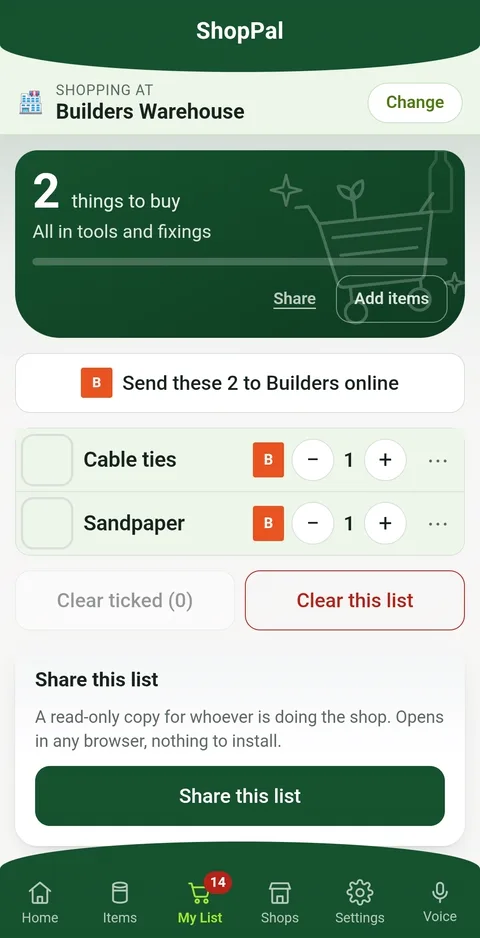
A hardware shop has aisles too. Add Builders, Cashbuild or a nursery and it knows what kind of shop that is — tools, paint, plumbing, garden and pool instead of the dairy and the bakery. Pool chlorine belongs on a list as much as milk does.
One shopping list, two phones. Either of you adds things during the week, and ticking something off in the shop shows up on the other phone straight away. No more two loaves of bread.
Or send a link to somebody without the app
Different from sharing the list with your household, and worth saying which is which. This one is a read-only link to a single shop's list — for whoever is passing the shop anyway. It opens in any browser, there is nothing to install, and they cannot add to it or tick anything off.
It stays right, though. Add something at home and their copy has it; tick something off and it leaves their copy too, so the person standing in the shop is never reading yesterday's list.
Say it instead of typing it
“Add milk and bread to Checkers.” You talk the way you would to somebody in the kitchen and it pulls the things out of the sentence, shop included. Afrikaans too.
It happens on the phone. Nothing about your list is sent to anything that understands language.
Bread at the hypermarket, cement at the builder
Toothpaste turns up at the supermarket and the pharmacy, a hammer only at the builder, pool chlorine at both. When you do mean one shop, it is listed under the box as you type.
Adding something already on the list brings it back rather than writing it twice.
Cooking something? The ingredients come straight over
One tap sends a recipe’s ingredients to whichever list you like — without the grams and the chopping, because a shop wants “butter”, not “250 g butter, softened”. Doubled the batch? They arrive doubled.
Pancake photograph by Ossewa, cropped — Wikimedia Commons, CC BY-SA 4.0.

Or have it delivered instead
Some weeks nobody is walking anywhere. Where a delivery service covers your shop, the list hands the whole thing over in one tap rather than being retyped — and it is still ticked off here.
Free, offline, and nothing to sign up for
No email address, no password, no adverts, nothing sold. Your list stays on your phone unless you deliberately share it, and it works with no signal — which matters more in a supermarket than most places. Location, if you allow it, is read once at the start of a shop and never leaves the device.
Sharing does quietly create an anonymous account so the two phones can be told apart. There is nothing to fill in and nothing that identifies either of you, and a list you share is stored in the clear on the server rather than encrypted — what protects it is a code nobody can guess. Exactly what leaves your phone is written out for all eight apps.
And this is it, on a phone
Three screens out of the app as it stands today. Nothing staged.